Red Hat Linux 9 Installation


Latest version of DB2 supports RHEL 9. In this blog we will go through steps to install RHEL 9 on Oracle Virtual Box for DB2 Lab setup.


Step1: Download RHEL 9

You can download RHEL from Red Hat Linux website. You would need a Red Hat account to download RHEL. If you do not have a Red Hat account you can create free of cost account from Red Hat Account. RHEL 9 DVD ISO file size is 10 GB. As part of Red Hat Developer program you can download any RHEL version which is currently supported by Red Hat. This RHEL product must only be used for development and not for production. 


Step2: Configure VM to boot RHEL 9 installation DVD

Open Oracle VirtualBox, select your VM and click on Settings button


In Settings click on Storage button, under Controller : IDE ensure your RHEL iso file is selected.

Right click on your VM and select Start and then select Normal Start to boot your VM.


Step3: Install RHEL 9 on your VM


Once VM boots you will see Red Hat Enterprise Linux 9 installation screen. On this screen with the help of arrow key on your keyboard select Install Red Hat Enterprise Linux and hit Enter Key on your keyboard.


You would get similar screen indicating Stop and Start of process, after couple of minutes you would get a GUI screen.


In this screen you can modify keyboard layout and language for installation, by default keyboard layout is US and language is English (United States). 

Click on Continue button.


Click on Time & Date to update timezone and correct date & time. You should also enable Network Time by default if it is disable.


Click on Connect to Red Hat and configure your RHEL VM to connect to Red HAT server using your developer account. 


Click on Installation Destination to setup disk partition. Setup partition as required.


Click on Software Selection and select Server with GUI.


Click on Network & Host Name to configure hostname and network configuration.
Click on IPv4 Settings, select Method as Manual instead of Automatic. You should have static IP for you VM. In Addresses field update new static Address, Netmask and Gateway. You can also update DNS servers.

Click on Save.


Click on Root Password and configure password for root user. Also click on User creation and specify detail to create user.


Once all configuration is done click on Begin Installation.


You can see installation progress.


Once Installation completes click on Reboot System


After Reboot you will get login screen.


You can also try login to VM using SSH tool.


With this RHEL 9 VM is ready for DB2 Installation and configuration.


If you liked this blog and interested in knowing more about DB2, please subscribe by clicking on Subscribe to ChoudharySumit.com by Email.

What's new with DB2 12.1.1

 IBM has released Mod Pack 12.1.1 based on DB2 latest version 12.1 which was released in October 2024. Check blog to know more about DB2 12.1In this blog we will go through new enhancement in DB2 V12.1.1

Download Link: https://www.ibm.com/support/pages/node/7182333

DB2 LUW 12.1

Finally after a long wait, IBM released DB2 LUW 12.1. In this blog we will cover different editions offered, features available in each editions, DB2 licensing modal, New features of DB2 12.1, Changed, Deprecated and Discontinued functionality in DB2 LUW 12.1.


Highlights of DB2 LUW 12.1

DB2 LUW 12.1 rolls out 200+ features including following:

  • AI Powered query optimizer
  • Namespace separation with new tenancy model
  • Db2 pureScale enhancements
  • Performance enhancements for backups with intra-tablespace parallelism
  • Apple Silicon driver support
  • Security enhancements
  • Federation enhancements
  • Cloud object storage performance and scalability enhancements
  • Columnar tables performance enhancements


System Requirements for DB2 LUW 12.1

Minimum supported OS version is as below:

Linux: RHEL 9.4, SLES 15 SP 6, Ubuntu 22.04 LTS

AIX: AIX 7.3 TL 2

Windows: Windows 11 Enterprise, Windows 11 Pro, Windows Server 2022 Datacenter Edition, Windows Server 2022 Standard Edition

Disk Space: Storage requirement depends on edition and installation method you choose. For Linux and Unix environment you need 2 GB of free space in /tmp directory.

Memory: DB2 requires minimum of 256 MB of RAM. It is recommended to have 1 GB of RAM for better performance.

For detailed system requirement, please check DB2 System requirement.


DB2 Editions for DB2 LUW 12.1

Code base for all DB2 edition is same, different editions just have different resource limit and features. To switch from one edition to another you just have to apply appropriate license key and there is no need to do a fresh installation. DB2 LUW 12.1 offers below editions:

  • DB2 Community Edition
            DB2 Community edition is free database solution offered by IBM. It has all the core capabilities offered by DB2 LUW database. It has resource limit of 4 core of CPU and 8 GB of memory. IBM doesn't offer Enterprise support for DB2 Community edition.
  • DB2 Starter Edition
            DB2 Started Edition is a new edition offered from DB2 LUW 12.1.It also has all the core capabilities offered by DB2 LUW database. It has resource limit of 4 core of CPU and 16 GB of memory. This edition also restricts advance functionality like HADR, PureScale, DPF, Native Encryption Audit logging, Point in time recovery. This edition comes with Enterprise support and IBM offers this edition license on Virtual Processor core (VPC) metric for production and non-production workload. 
  • DB2 Standard Edition
            DB2 Standard Edition offers all features of DB2 LUW 12.1 except DB2 PureScale and DPF. It has resource limit of 16 core of CPU and 128 GB of memory. This editions comes with Enterprise support and IBM offers this edition license on Virtual Processor core (VPC) metric for production and non-production workload. IBM also offer license on Authorized User (AU) metric for non-production workload.
  • DB2 Advanced Edition
            DB2 Advance Edition offers all features of DB2 LUW 12.1 with no resource restrictions. This editions comes with Enterprise support and IBM offers this edition license on Virtual Processor core (VPC) metric for production and non-production workload. IBM also offer license on Authorized User (AU) metric for non-production workload.


New Features of DB2 LUW 12.1

  • Highlights of DB2 LUW 12.1
            AI Query Optimizer: In DB2 LUW 12.1 for all new database AI query optimizer is enable by default. You can enable/disable AI query optimizer by updating DB CFG parameters AUTO_AI_MAINT, AUTO_AI_OPTIMIZER, AUTO_MODEL_DISCOVERY.

            Reorg Recommended Operation: Reorg recommended operation limit increased from 3 to 31.

            Namespace Isolation by using DB2 Tenant object: DB2 12.1, you can create independent and unique namespace for user defined database object. You can create objects with same schema and object name in different tenant. E.g. You have 2 tenant called tenant1 and tenant2. You can create schema with same name Schema1 in both tenant. Schema1 in both tenant can have table with name table1. One of the use case for tenant object is when there are multiple developers working on a database and each developer needs different database to not conflict with each other works. In such case we can create different tenant for each developer instead of creating separate database. Privileges defined on objects insides tenants are within tenant limit.

  • Performance Enhancements
            Backup Performance: With DB2 12.1, setting registry variable DB2_BACKUP_ITP to ON will enable use of parallel thread to backup each tablespace. This can be help to improve backup performance for databases where most of the data is concentrated on few larger tablespaces. Change to DB2_BACKUP_ITP  registry variable is online and takes effect when next backup gets triggered. It does not require instance restart.

  • Security Enhancements:
            Trusted Connections Monitoring: Now we can monitor metrics related to trusted connections from mon table functions MON_GET_CONNECTION, MON_GET_CONNECTION_DETAILS. You can refer to column TRUSTED_CONN_TYPE, TRUSTED_CTX_NAME, TRUSTED_CTX_ROLE.

  • Manageability Enhancements:
            ADMIN_MOVE_TABLE: Now ADMIN_MOVE_TABLE can be used to perform online movement of columnar table. In DB2 11.5.9 and earlier only read access was allowed on source table by using ALLOW_READ_ACCESS option. RENAME_INDEXES process has been moved to CLEANUP phase from SWAP phase. This will reduces chances of application facing deadlock when trying to access source table during SWAP phase. ADMIN_MOVE_TABLE now supports range-clustered tables.

  • Federation Server Enhancements:
            Federation Support: Federation support Databricks and SAP ABAP SQL Service as data source for establishing connection, data type mapping, function push-down and server attribute optimization. DB2 also started to support Oracle 21c and 23ai as data source.

            Bulk Insert support for Snowflake: DB2 now support bulk insert operation for Snowflake data source.

            Large Objects Operations: DB2 now supports LOB operations on remote table for MariaDB, Microsoft Azure, Microsoft SQL Server, Netezza, Oracle, Oracle MySQL, Greenplum, PostgreSQL, SAP HANA, Snowflake through ODBC wrapper.


  • High Availability, Backup and recovery Enhancements

            Read only access to HADR Standby during upgrade: New upgrade process allows ready only access to HADR Standby database when Primary is getting upgraded.

            DB2_HADR_BLOCK_ON_DISKFULL: This registry variable if set to OFF, will shutdown Standby database if DB2 encounters Active log path disk full issue on standby. If this registry variable is set to ON, it will keep Standby database up in case of Active log path disk full issue on standby. If this issue is encounters STANDBY_LOG_DEVICE_FULL flas will be set in HADR flag field. This will block all transactions on Primary untill disk full issue gets fixed on Standby. Default value for this registry variable is ON. Changes to this registry variable is immediate on Standby.

        Pacemaker: Pacemaker has been upgrade from 2.1.6 to 2.1.7. Pacemaker now also supports automatic failover for DPF on Linux env.

        History File Enhancements: Now history file will contains additional details like Total_Size, SEQ_SIZE, COMPRESSION_LIBRARY, ENCRYPTED, INCLUDE_LOGS.

        Automatic Backup Ehnancements: Automatic backups now supports remote storage targets.

        DB2_VALIDATE_LOG_ON_ARCHIVE: If this registry variable is set to ON, DB2 will perform validation of log file before archiving. If there is issue with log file DB2 still log file will be archived which will not stop archival of subsequent log files. You can check for validation failure by looking into notification log, db2 history, db2pd -logs output, MON_GET_TRANSACTION_LOG table function. By default this registry variable is set to ON.


  • PureScale Enhancements: 
            PureScale now supports Pacemaker in Linux env. New PureScale deployment in 12.1 will use Pacemaker as default cluster manager. For cluster getting upgraded to 12.1 as part of upgrade process TSA cluster will be dropperd and Pacemaker cluster will be created automatically. Multiple enhancement has been made to handle dropped member situation like now there is no restrictions of offline backup post dropper member topology change event. Database restore and rollforward is possible when there is different between topology of backup image and target system.

  • Workload Management Enhancements:
            Adaptive workload manager is enabled for all newly created DPF databases.


Changed Functionality in DB2 LUW 12.1

  •  Registry Variables: DB2_FAIL_RECOVERY_ON_TABLESPACE_ERROR now supports ROLLFORWARD and CRASHRECOVERY options. For DB2_BCKP_PAGE_VERIFICATION registry variable default value is changed from OFF to ON. For DB2_USE_ALTERNATE_PAGE_CLEANING registry variable default value if changed to ON.

  • Security Functionality: SSL Hostname validation is enabled by default. While granting DBADM, DATACCESS and ACCESSCTRL authorities are not granted by default. This can be enabled by setting registry variable DB2_ALTERNATE_AUTHZ_BEHAVIOUR.When creating a new database, CONNECT, CREATETAB, IMPLICIT_SCHEMA, BINDADD on database, CREATEIN on NULLID and SQLJ schemas, and USE on table space USERSPACE1 are no longer granted to PUBLIC by default. This can be enabled by setting registry variable DB2_ALTERNATE_AUTHZ_BEHAVIOUR.

  • Catalog View Change: Catalog view having authorization details contains new timestamp column to record first grant time and last grant or revoke time.

  • DB2 Setup: If you run db2ckupgrade without specifying database name it will check instance level configuration for discontinued values. Also now there is option to run db2ckupgrade just for instance by using option -instOnly

Deprecated Functionality in DB2 LUW 12.1

  • DB2_HADR_NO_IP_CHECK registry variable.
  • UNFORMATTED EVENT TABLE targets for event monitors: Use WRITE TO TARGET instead of WRITE TO UNFORMATTED EVENT TABLE while creating event monitors.
  • db2convert utility: User ADMIN_MOVE_TABLE to convert row organized table to column organized table.

Discontinued Functionality in DB2 LUW 12.1

  • db2top discontinued: db2top is not supported anymore on SUSE 15.6 or later
  • Load Client with remote storage alias: Load Client which usages remote storage alias is no more supported.
  • Ingest operation with remote storage alias: Ingest operation which usages remote storage alias is no more supported.
  • db2pd -ha: db2pd -ha option is discontinued in Linux env.
  • db2haicu: db2haicu utility is discontinued in Linux env.
  • TSA: TSA is discontinued as cluster managed in Linux env.
  • db2mtrk: db2mtrk command is discontinued.
  • TLS 1.0/1.1: TLS 1.0/1.1 is discontinued for Client Server communication(SSL) and LDAP authentication plugins. by default TLS 1.2 and 1.3 are enabled.
  • Load Restart: Load restart option of load command is discontinued.
  • DAS: DAS and its associated functionality is discontinued.
  • Table functions: Table functions SNAP_GET_APPL_INFO_V95, SNAP_GET_APPL_V95, SNAP_GET_BP_V95, SNAP_GET_CONTAINER_V91, SNAP_GET_DBM_V95, SNAP_GET_DB_V97, SNAP_GET_DETAILLOG_V91, SNAP_GET_DYN_SQL_V95, SNAP_GET_STORAGE_PATHS_V97, SNAP_GET_TAB_V91, SNAP_GET_TBSP_PART_V97, SNAP_GET_TBSP_V91, WLM_GET_SERVICE_CLASS_AGENTS_V97, WLM_GET_SERVICE_CLASS_WORKLOAD_OCCURRENCES_V97, WLM_GET_SERVICE_SUBCLASS_STATS_V97, WLM_GET_WORKLOAD_OCCURRENCE_ACTIVITIES_V97, WLM_GET_WORKLOAD_STATS_V97, WLM_GET_ACTIVITY_DETAILS are discontinued.

For detailed documentation check IBM official document.

To explore DB2 LUW 12.1 download DB2 12.1.


If you liked this blog and interested in knowing more about DB2, please subscribe by clicking on Subscribe to ChoudharySumit.com by Email.


Connect to DB2 Database with SSL using DBeaver, IBM Data Studio

    In blog DB2 SSL, we understood how to configure SSL for DB2 instance and DB2 clients. In this blog we will go through steps to configure DBeaver and IBM Data Studio to connect to DB2 instance with SSL.

Steps listed below can be followed for any Java based tool which will connect with DB2 database with SSL.

Configure DB2 Pacemaker cluster for HADR

In blog DB2 Pacemaker we covered why to use DB2 Pacemaker, Pacemaker process and limitations of DB2 Pacemaker in DB2 version 11.5.8.0 and earlier. In this blog we will go through prerequisite of DB2 Pacemaker, DB2 Pacemaker installation, Configure Pacemaker cluster for HADR, Configure Quorum Device.

DB2 Pacemaker

Pacemaker is an open source cluster resource manager software since 2004. IBM integrated Pacemaker with DB2 starting DB2 version 11.5.4.0. In version 11.5.4.0 Pacemaker was introduced as Technical Preview and then released for production use in 11.5.5.0. If you want to use open source Pacemaker cluster with DB2 you can use it but for Pacemaker cluster issues, you will not get support from IBM. Pacemaker can be used to automate failover in HADR env and setup mutual failover env.


Why to use DB2 Pacemaker:

Setup VM using Oracle Virtual Box 7

In blog Setup VM for DB2, we covered how to install and create VM using Oracle Virtual Box 6. Oracle has released Oracle Virtual Box 7 and process is bit different from Virtual Box 6. 

In this blog we will cover installation of Oracle Virtual Box 7 and creating a VM.

Step1: Download Oracle Virtual Box

You can download Oracle Virtual Box from  Download Oracle Virtual Box


Automatically Restart DB2 using Fault Monitor

We can automate auto restart of DB2 instance post DB2 instance failure or server restart in standalone setup using DB2 Fault monitor. In this blog we will go through steps to Enable Fault Monitor.

Fault Monitor will help to restart DB2 instance if DB2 instance goes down due to any reason except for instance been stopped due to db2stop command.

Fault monitor must be enabled only on standalone system and not on system where you have cluster services enables like TSA, HACMP, Pacemaker etc.

Note: Post DB2 fixpack upgrade, Instance upgrade or after applying Special build, you need to reconfigure DB2 Fault monitor, otherwise fault monitor will not work.

Steps to Enable Fault Monitor

1. Enable auto start of Instance

Run below command to enable auto start of db2 instance after server restart.

db2iauto -on <instanceid>


What's new with DB2 11.5.8

I am excited to share that IBM released the much awaited DB2 release. In this release, IBM is delivering multiple new features that will help us build new use-cases and exciting new enhancements that could help us bring down the cost of our data management. In this blog we will go through new enhancement in DB2 V11.5.8 

Download link : https://www.ibm.com/support/pages/node/6830623


What's new with Db2 11.5.7

I am excited to share that IBM released the much awaited Db2 release. In this release, IBM is delivering multiple new features that will help us build new use-cases and exciting new enhancements that could help us bring down the cost of our data management. In this blog we will go through new enhancement in DB2 V11.5.7.0. 

Download link : https://www.ibm.com/support/pages/node/6524304

What's new with Db2 11.5.6 Webinar

I am excited to share that IBM will be releasing the much awaited Db2 release in the end of June 2021. In this release, IBM is delivering multiple new features that will help us build new use-cases and exciting new enhancements that could help us bring down the cost of our data management. To ensure that we have all the information and get an opportunity to ask IBM questions, IBM is organizing a 5-session webinar series open to all, free of cost. Register using below link to learn about DB2 11.5.6 from IBM experts.

SQL0802N Arithmetic overflow or other arithmetic exception occurred for count(*) Query

While working with count function with huge data set you will get error SQL0802N  Arithmetic overflow or other arithmetic exception occurred. SQLSTATE=22003. You might also receive sqlcode -802, sqlstate 22003 error in your application log. You might get confused by seeing error Arithmetic overflow or other arithmetic exception occurred. for count function.

SQL0802N  Arithmetic overflow or other arithmetic exception occurred


Data Masking in DB2

User Data security is one of the critical aspects of database administration. Its DBAs responsibility to ensure data must only be accessed by authorized users and DBAs can control that by restricting access at various level. In some cases you want to completely or partially conceal data depending on who is accessing it, e.g. In Payroll application, manager can view only last 4 digit of employees SSN while a team member cannot see SSN of other employees but can see his/her SSN. If we try to achieve this at application level it will increase application complexity as well as might impact application performance but still your database is vulnerable. If a user gets access to database they can see any employee SSN. Best way to achieve it by Data Masking at database level. 

Data breaches might lead to financial loss, reputational damage, operational downtime, legal action, loss of sensitive data. With changing data privacy law and regulations its even critical now to ensure data is adequately protected. 

In DB2 LUW database Data Masking can be achieved with the help of Column Mask which was introduced in DB2 10.1 as part of Row and Column Access Control (RCAC) . In this blog we will go through steps to enable data masking in DB2 LUW and few scenarios of data masking.


How to Create Column Mask in DB2 LUW?

Column Mask can be created using CREATE MASK command. To create mask user must have SECADM authority, no other privilege is require like select on table or execute on function.

CREATE MASK <mask name> ON <table name> FOR COLUMN <column name> RETURN <case expression> ENABLE

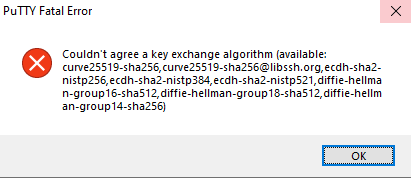
Putty Fatal Error : Couldn't agree a key exchange algorithm

While working with PuTTY to SSH to Unix/Linux servers you might get error Putty Fatal Error : Couldn't agree a key exchange algorithm. Sometime this error can be specific to some servers while for other servers ssh works perfectly fine. In this blog we will see how to fix this issue.

Putty Fatal Error : Couldn't agree a key exchange algorithm

How do you raise a case with IBM support?

As a DB2 DBA or as a matter of fact if you are using any IBM product irrespective of hardware or software you might be in a situation where you might need support from IBM experts. To get IBM expert support you need to create SR (Service Request) with IBM , formerly known as PMR (Problem Management Report). In this blog we will go through steps to create IBM ID, add customer ID to your IBM id and finally create/view and update SR.


URLs to create IBM SR:

There is separate portal to create/view/update Hardware and Software SRs. You can use below URL to navigate to IBM SR portal.

Hardware SRs: https://www-946.ibm.com/support/servicerequest/Home.action

Software SRs : https://www.ibm.com/mysupport/s/?language=en_US

These URLs are valid as on date of publication of this blog, I will try my best to keep it updated with latest URL but in case it doesn't work, feel free to reach out to me to inform about it or put a comment below.

Tablespace Management in DB2

Tablespace is logical collection of containers which contains actual data of database. In DB2 LUW there is 3 types of tablespace SMS (System Managed Spaces), DMS (Database Managed Spaces) and Automatic Storage. In this blog we will go through different tablespace management operation and behavior of SMS, DMS and Automatic Storage for those operations.

DB2 Tablespace Type


In this blog, we will go through different tablespace operations applicable for tablespaces using File or path based containers.

Create SAMPLE database in DB2

In this blog we will go though steps to create sample database. You might need SAMPLE database with tables, views, index, function, procedure and dummy data to conduct POC or for testing, learning purpose. You will need a DB2 instance to create SAMPLE database. Check blog How to create DB2 Instance on Linux for instructions to create DB2 instance and start it.

Prerequisite :

To create SAMPLE database you need a DB2 instance, also you should have SYSADM or SYSCTRL authorities for that instance.

Enable SSL for DB2 HADR Communication

In blog DB2 SSL we went through importance of SSL and steps to configure SSL for DB2 communication both at DB2 Server side and client side. In this blog we will go through steps to configure SSL for DB2 HADR communication. If you want you can configure SSL for both DB2 client and server communication as well as for HADR communication or only for HADR communication also. If you have not read blog DB2 SSL, I highly recommend to go through it first before moving into detailed steps to configure SSL for DB2 HADR communication.

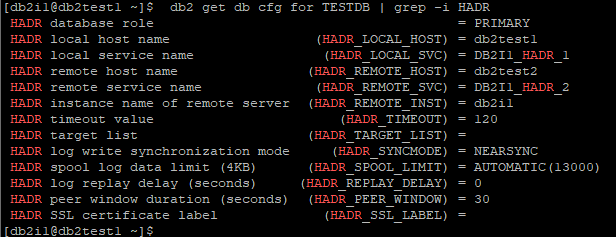
In this blog we will use 2 Local KeyStore, one for Primary and other for Standby. We will consider a 2 node HADR setup with below configuration. In case you have more than 1 Standby nodes then you need to perform below steps on all other Standby nodes as well.

Primary Node : db2test1, Instance : db2i1

DB2 HADR Configuration


Standby Node : db2test2, Instance : db2i1

DB2 HADR Configuration


Encrypt DB2 HADR Database Setup without Downtime

In blog DB2 Native Encryption, How to Encrypt DB2 DatabaseHow to Encrypt DB2 Database using Centralized KeyStore we went through DB2 Native Encryption and understood step by step process to encrypt DB2 standalone database using both Local KeyStore and Centralized KeyStore. Encrypting DB2 standalone database involve downtime. In this blog we will go through step by step process to encrypt DB2 database in HADR setup without Downtime, before we proceed I would suggest to check above blogs to understand DB2 Native encryption and steps to configure it. 

In this blog we will use 2 Local KeyStore, one for Primary and other for Standby. You can use shared Local KeyStore as well, by creating KeyStore on shared File System.

We will consider a 2 node HADR setup with below configuration:

Primary Node : db2test1, Instance : db2i1

DB2 HADR Configuration


Standby Node : db2test2, Instance : db2i1

DB2 HADR Configuration


Shared Folder Access in Oracle Virtual Box Linux VM

You might be in a situation in which you need a shared file system between multiple VM or between your VM and host OS on which you can perform both read and write operation simultaneously. Oracle Virtual Box has a answer to this in form of Shared Folder feature but to use Shared Folder feature in your VM, you must install Virtual Box Guest Additions. This simple looking Virtual Box Guest additions is quiet complicated to setup in Linux VM, it becomes even more complicated if you are not a Linux admin. In this blog we will go through step by step process to setup Virtual Box Guest Additions and Add a Shared Folder in VM and access it.

Step1: Prerequisite

To configure Virtual Box Guest Addition, you need to have kernel-devel, gcc, make and elfutils-libelf-devel package installed. Run below command to check if packages are already present.

yum list gcc make kernel-devel elfutils-libelf-devel

yum list gcc make kernel-devel elfutils-libelf-devel